TapRaise
Automate face-to-face fundraising data from TapRaise to Salesforce. Sync pledges, donations, recruiter performance & call centre data in real-time for complete F2F campaign visibility.
Overview
The MoveData TapRaise integration provides seamless, real-time synchronisation between your TapRaise face-to-face fundraising platform and Salesforce. This powerful integration ensures that all pledge activities, supporter registrations, payment data, and field team performance metrics are automatically transferred to your Salesforce environment, eliminating manual data entry whilst maintaining complete data accuracy.
Key Benefits
- Near-Real-time synchronisation of all TapRaise face-to-face fundraising activities
- Comprehensive pledge management with support for one-time and recurring donations
- Detailed field intelligence capturing recruitment context and location data
- Advanced payment recording including SEPA Direct Debit and card payments
Integration Summary
| Field | Value |
|---|---|
| Product | https://tapraise.com/ |
| Method | Pull (Polling) |
| Frequency | Configurable (Default: 12 hours) |
Supported Modes
Logic is required to map TapRaise notifications to your Salesforce data. To quickly and easily do so we recommend using one of the supported MoveData Extensions.
| Extension | Supported |
|---|---|
| Fundraising and Donations | ✅ |
| Commerce | ❌ |
Note
The Fundraising and Donations Extension is relevant to processing face-to-face fundraising activity and donation information into Salesforce.
Setup
TapRaise API Credentials
To set up the TapRaise integration, you will need to request API credentials from TapRaise:
- Private Key Certificate - Your RSA private key in PKCS#8 format
- Private Key ID - Your 40-character private key identifier
- Service Account Email - Your TapRaise service account email address
MoveData TapRaise Configuration
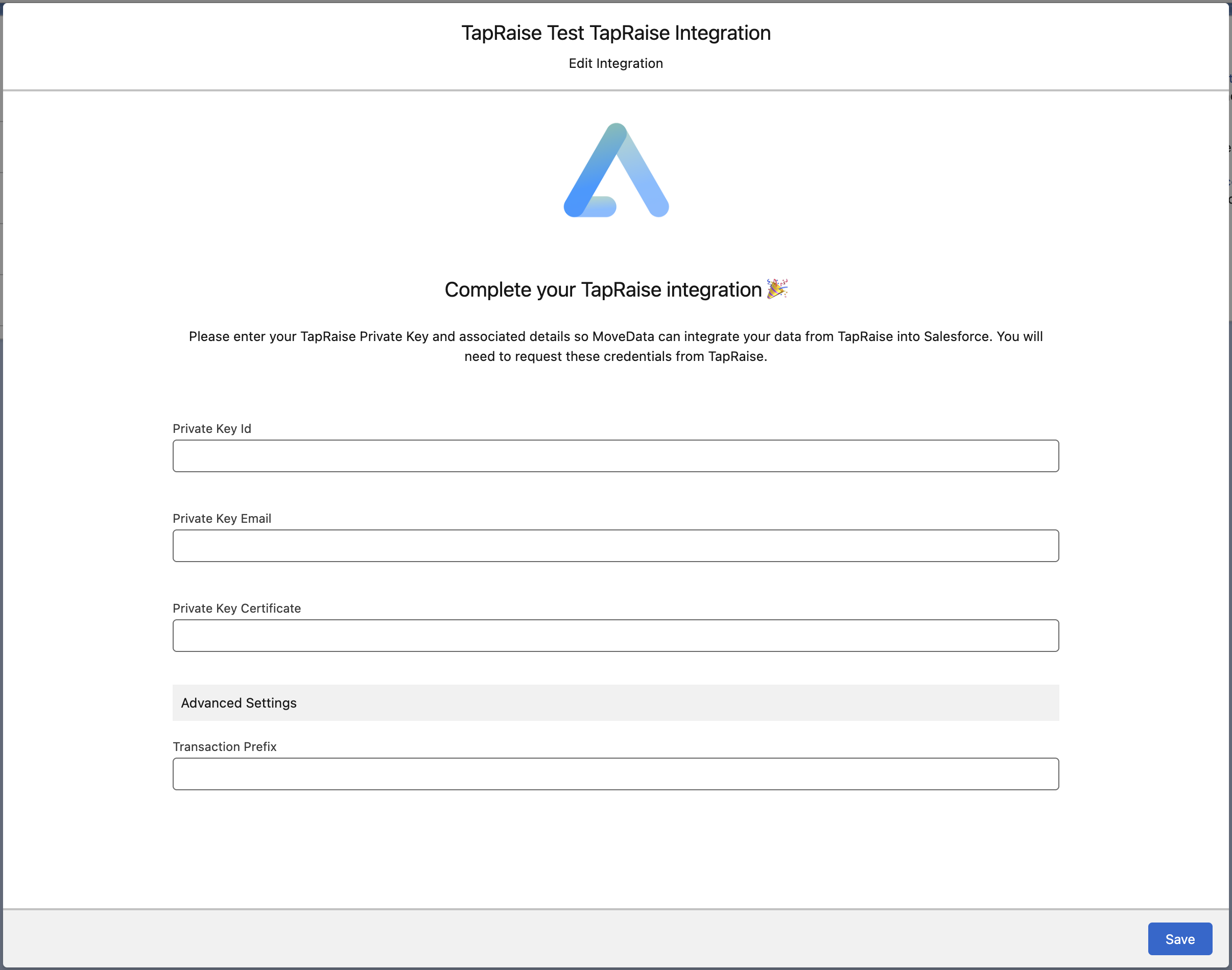
- Open the MoveData app in Salesforce and select the Integrations tab
- Click New Integration and select TapRaise from the list of available integrations
- Add a descriptive name for your integration and click Save
- Enter your TapRaise credentials in the configuration screen:
- Private Key ID: Your 40-character private key identifier
- Private Key Email: Your TapRaise service account email address
- Private Key Certificate: Your RSA private key certificate (must include
-----BEGIN PRIVATE KEY-----and-----END PRIVATE KEY-----) - Configure additional options as needed (see Configurable Options below)
- Click Save to complete the setup
The integration will automatically begin synchronising data based on the default polling schedule.
Configurable Options
| Option | Description |
|---|---|
| Transaction Prefix | A prefix to add to each platform key. Required for multiple TapRaise integrations to prevent key collisions between different TapRaise environments or organisations. |
Data Migration
Data Migration is available upon request. This is a custom service provided by MoveData and is delivered by MoveData Professional Services.
- Requires API access to your TapRaise platform
- Records will only be imported if available via the TapRaise API
- Historical data available based on your TapRaise data retention policies
- Supports both pledge and transaction data migration
Supported Types
The TapRaise integration processes two main types of notifications:
-
Pledge Notifications (Metadata Actions):
-
Created when new pledges are established in TapRaise
- Contain supporter information, pledge amounts, and recurring donation schedules
- Include recruitment context (recruiter, location, organisation)
-
Generate recurring donation records in Salesforce for ongoing pledges
-
Transaction Notifications (Donation Actions):
-
Created when payments are processed against pledges
- Include payment method details, transaction status, and settlement information
- Link back to parent pledge records for recurring donations
- Generate individual donation records in Salesforce
Additional Field Mappings
Where possible, all fields are mapped to the appropriate schemas. TapRaise-specific data is included as custom fields to preserve the rich context from face-to-face fundraising activities.
Contact Custom Fields
| Attribute Name | Description | Example |
|---|---|---|
initials |
Supporter's initials | E. |
mobilePhone |
Mobile phone number | +31610899458 |
phone |
Landline phone number | +31306958898 |
houseNumber |
House number | 2 |
houseNumberExtension |
House number extension | A |
Campaign Custom Fields
All TapRaise data is organised under a single default campaign:
| Attribute Name | Description | Example |
|---|---|---|
key |
Campaign identifier | tapraise |
name |
Campaign display name | TapRaise |
type |
Campaign type | campaign |
Recurring Donation Custom Fields
| Attribute Name | Description | Example |
|---|---|---|
iban |
Bank account details for SEPA | NL09RABO0323205348 |
status |
Pledge status from TapRaise | lead, active, fulfilled |
frequency |
Payment frequency | monthly, quarterly, yearly, once |
Donation Custom Fields
| Attribute Name | Description | Example |
|---|---|---|
name |
Transaction account name | L E BRUSSEL |
description |
Transaction description | Bedankt voor uw donatie |
iban |
Payment account IBAN | NL46ABNA0417550588 |
processor |
Payment processor | cm (ConvertingMoney) |
method |
Payment method | idealqr, sepa |
Field Team Intelligence Custom Fields
| Attribute Name | Description | Example |
|---|---|---|
recruiterIdentifier |
Unique recruiter/fundraiser ID | 11 |
externalSourceIdentifier |
External system reference | 1567640 |
recruitmentType |
Type of face-to-face recruitment | street, d2d (door-to-door) |
recruitingLocation |
Location where recruitment occurred | Amsterdam Central |
recruitingOrganization |
Agency/organisation conducting recruitment | Trust Marketing Groep |
calls |
Call centre verification data (JSON) | Detailed call attempt logs |
Other Resources
TapRaise Platform:\ https://tapraise.com/
MoveData TapRaise Integration Page:\ https://www.movedata.io/tapraise-salesforce-integration/