Settings
The MoveData Settings page provides centralised configuration for the MoveData application and associated extensions.
General Settings
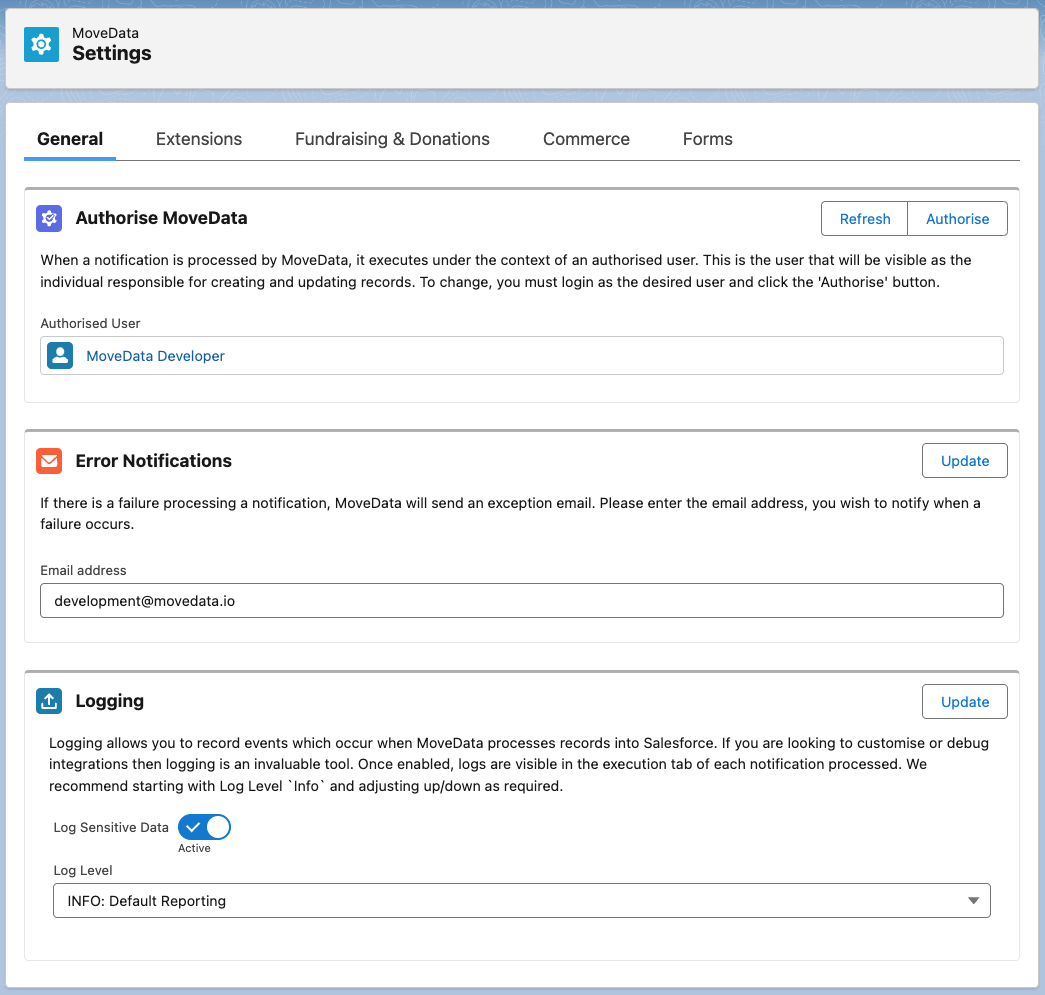
The General tab contains core configuration options that apply across all your MoveData integrations.
Authorise MoveData
Danger
MoveData cannot work with a Salesforce Integration User Licence due to the heavy limitations of this licence.
- Purpose: Establishes the user context under which MoveData executes when processing notifications and creating records in Salesforce.
When a notification is processed by MoveData, it executes under the context of an authorised user. This user will be visible as the individual responsible for creating and updating records. The authorised user's permissions and access levels determine what actions MoveData can perform in your Salesforce org.
The user context will be determined by logging in to Salesforce and granting MoveData an OAuth token. This token can be revoke from within Salesforce at any point in time, denying MoveData access to your Salesforce environment.
Best Practice
Use a dedicated integration user account with appropriate permissions rather than a personal user account. This ensures consistent access and prevents disruption if individual users leave the organisation.
Configuration
- Authorised User: Displays the currently authorised user (e.g., "System Administrator")
- Refresh: Updates the authorisation token for the current user
- Authorise: Allows you to change the authorised user
To change the authorised user:
- Click Authorise
- Login as the desired user when prompted
- Grant the necessary permissions
- Verify the new user appears in the Authorised User field
Error Notifications
- Purpose: Configures email alerts when MoveData encounters processing failures.
If there is a failure processing a notification, MoveData will send an exception email to notify administrators of issues requiring attention. This ensures prompt resolution of integration problems and maintains data flow reliability.
Important
Ensure the email address is actively monitored by technical staff who can respond to integration issues promptly.
Configuration
- Email address: Enter the email address to receive error notifications
- Update: Click to save email address changes
Logging
- Purpose: Controls the level of detail recorded for integration activities and troubleshooting.
Logging allows you to record events which occur when MoveData processes records into Salesforce. If you are looking to customise or debug integrations, logging is an invaluable tool. Once enabled, logs are visible in the execution tab of each notification processed.
Recommendation
Start with "INFO: Default Reporting" and only increase to DEBUG when troubleshooting specific issues, as higher log levels can impact performance.
Configuration Options
Log Sensitive Data
- Active/Inactive Toggle: Controls whether sensitive information is included in logs
- When active, detailed field values and personal data such as Salesforce records are logged
- When inactive, only data from the notification is recorded
Log Level
Controls the verbosity of logging information
- INFO: Default Reporting - Standard level showing successful operations and basic errors
- DEBUG - Detailed information useful for troubleshooting integration issues
- WARN - Warning messages about potential issues that don't prevent processing
- ERROR - Only critical errors that prevent successful processing
Privacy Considerations
- Only enable "Log Sensitive Data" when actively debugging issues
- Disable sensitive data logging in production environments to maintain donor privacy
Extensions
Extensions are collections of Lightning Flows and associated metadata which provide business logic for how MoveData processes information into Salesforce. Being managed packages, they are upgradeable over time so you get the benefit of new features as soon as they are made available.
Developer Note
Unless you are a developer looking to build a completely custom handler for processing information from MoveData into Salesforce, you must install the appropriate MoveData Extension(s).
Available Extensions
The three primary MoveData extensions are as follows:
- Non-Profit Cloud: Fundraising & Donations and Commerce
- Non-Profit Success Pack: Fundraising & Donations
- Non-Profit Success Pack: Commerce
Extension-Specific Settings
Once you have installed MoveData extensions, additional configuration tabs will appear in the Settings interface. These extension-specific settings allow you to customise how MoveData processes different types of data from your fundraising platforms into Salesforce.
Each extension provides a comprehensive suite of configuration options including record matching rules, field mapping preferences, data formatting settings, and business logic controls. These settings ensure that data from your external platforms integrates seamlessly with your existing Salesforce data model and organisational processes.
Detailed Configuration
For comprehensive guidance on configuring each extension's settings, please refer to the specific extension documentation within this knowledge base.
The extension-specific settings are designed to be intuitive whilst providing the flexibility needed to accommodate diverse organisational requirements and platform configurations.